As someone who is using many web services and also contributing there, many automated notifications accumulate over time. Jira Ticket updates, newly created Confluence pages in a folder I observe, Gitlab Merge Request status updates, … there is so much going on, and I personally like to read along whenever I have some spare minutes. So, turning off all those notifications is not an option for me. On the other hand, I would get hundreds of such mails to my inbox every day.
So, the first rather obvious step was to add a filter/rule, which moves all mail coming from automailers like jira-no-reply@foo.bar.com to a Notifications folder:

That works in a pretty straightforward manner. Makes my inbox much cleaner and I can browse the Notifications folder whenever I want. However, now I may miss especially relevant updates. How to find those?
Turns out, a good heuristic is to just use my own name as an indicator for relevance (at least for myself haha). So, I do not move any mail which contains my first name or my internal user id → those stay in my main inbox!
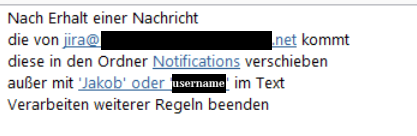
Of course, besides using your own name (or mine 😉) you can use other terms which indicate relevance.
This allows me to get all notifications, have the most relevant ones in my main inbox and, thus, stay on top of whats going on without drowning in internal update spam.
4 Antworten auf „The best mail filter rule in the world“
I have also created 2 another rules:
– move automatic replies to another folder and mark them as read – I can check who is absent in one place if needed later.
– messages from those who has accepted my invitation – I can always check it in Outlook anytime.
I have something similar – all meeting acceptance mails get deleted immediately. If someone rejects it stays in my inbox so I can adapt if needed.
I did the same long time ago, and went one step further. Disabled all email notifications(read it once per day or more frequently if have time), and established some automation, that messages me in chat when emails with particular words or from certain Domains are coming.
I used a simpler rule for the intense times to keep the focus up: don’t read emails, especially automated ones 🙂
After trying multiple ways and filters i decided in the „usual days“ to be quite strict about immediately deleting and unsubscribing from irrelevant things. Outlook also now automatically categorizes the updates in a separte category, achieving similar effects to your trick